My Account & personal area
https://pirt.demo.weebpal.com/my-account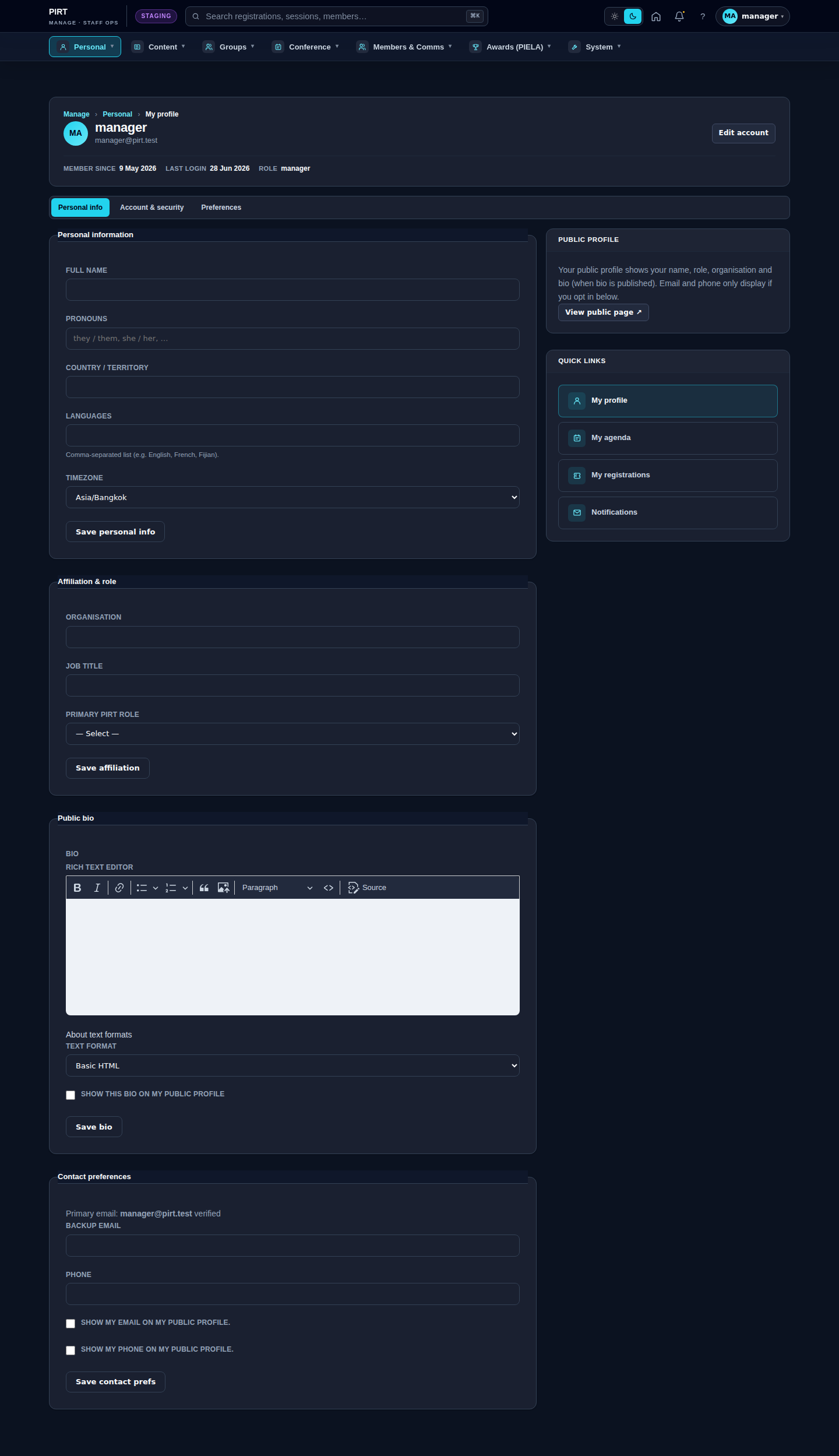
https://pirt.demo.weebpal.com/my-account.What this is
Every signed-in person on the Roundtable — whether you are an Editor, a Manager, or a delegate someone has invited — gets a small personal area: the self-service pages where you look after your own profile, agenda, registrations and notifications, and where you control your own data. None of it touches anyone else's records.
The same person actually has two ways in, depending on which part of the site you are standing in:
- The public delegate view — clean, conference-facing pages under
https://pirt.demo.weebpal.com/my-accountand your account page athttps://pirt.demo.weebpal.com/user. This is what a registered delegate sees from the public site. - The staff workspace view — the same functions, surfaced inside the dark
https://pirt.demo.weebpal.com/manageworkspace underhttps://pirt.demo.weebpal.com/manage/me/…andhttps://pirt.demo.weebpal.com/manage/notifications. Editors and Managers live here day to day.
They are two doors into the same data. Edit your name in one and it updates the other. Use whichever is closest to where you happen to be working.
Profile — name, organisation, country, password
Your profile holds the details shown next to your name across the site, plus your sign-in credentials.
Edit your details
- Open
https://pirt.demo.weebpal.com/manage/me/profile(in the workspace) or your account page athttps://pirt.demo.weebpal.com/user(public side). Fromhttps://pirt.demo.weebpal.com/my-account, the Profile tab takes you there too. - Update your full name, organisation, country and (where shown) a short bio or headline.
- Upload an avatar — square, at least 256 px, JPG or PNG. With no avatar, a monogram of your initials is shown instead, so it is worth setting your full name correctly.
- Click Save. The change appears beside your name within a few seconds.
https://pirt.demo.weebpal.com/manage/me/profile, with Profile, Account and Notifications tabs.Change your email or password
- On
https://pirt.demo.weebpal.com/manage/me/profile, switch to the Account tab (or openhttps://pirt.demo.weebpal.com/user/<id>/editon the public side). - Enter the new email or password. Drupal asks for your current password to confirm the change.
- Set your time zone here as well — it controls how every date renders for you across the site.
- Click Save. An email change is two-step: it only takes effect once you click the verification link sent to the new address.
My agenda & bookmarks
Bookmark conference sessions you want to attend and they collect into a personal agenda you can subscribe to from your own calendar.
Bookmark sessions
- Browse the public conference programme and click the bookmark (star) icon on any session card or detail page.
- The session appears immediately in your agenda. Click the star again to remove it.
- View the full list at
https://pirt.demo.weebpal.com/my-account/agenda(public) orhttps://pirt.demo.weebpal.com/manage/me/bookmarksandhttps://pirt.demo.weebpal.com/manage/me/agenda(workspace).
Add a custom agenda item
- Open
https://pirt.demo.weebpal.com/manage/me/agendaand click Add event, or go straight tohttps://pirt.demo.weebpal.com/manage/me/agenda/add. - Fill in a title, start and end date-time, and an optional location and notes.
- Click Save. The item shows on the day with a Custom tag. These entries are private to you — they never appear in the public programme or anyone else's view.
Subscribe to the iCal feed
- From the agenda, copy the personal feed URL (
https://pirt.demo.weebpal.com/my-account/agenda.ics, or the tokenisedhttps://pirt.demo.weebpal.com/manage/me/agenda.ics/<token>in the workspace). - Paste it into Google Calendar (Other calendars → Add by URL), Outlook (Add calendar → Subscribe from web) or macOS Calendar (New Calendar Subscription).
- Your calendar refreshes the feed periodically, so new bookmarks ripple through on its next sync. The token is personal — treat the URL like a password and don't share it.
My registrations
If you have registered for a conference, your registrations live at https://pirt.demo.weebpal.com/manage/me/registrations. The Registration tab on https://pirt.demo.weebpal.com/my-account shows the same record on the public side.
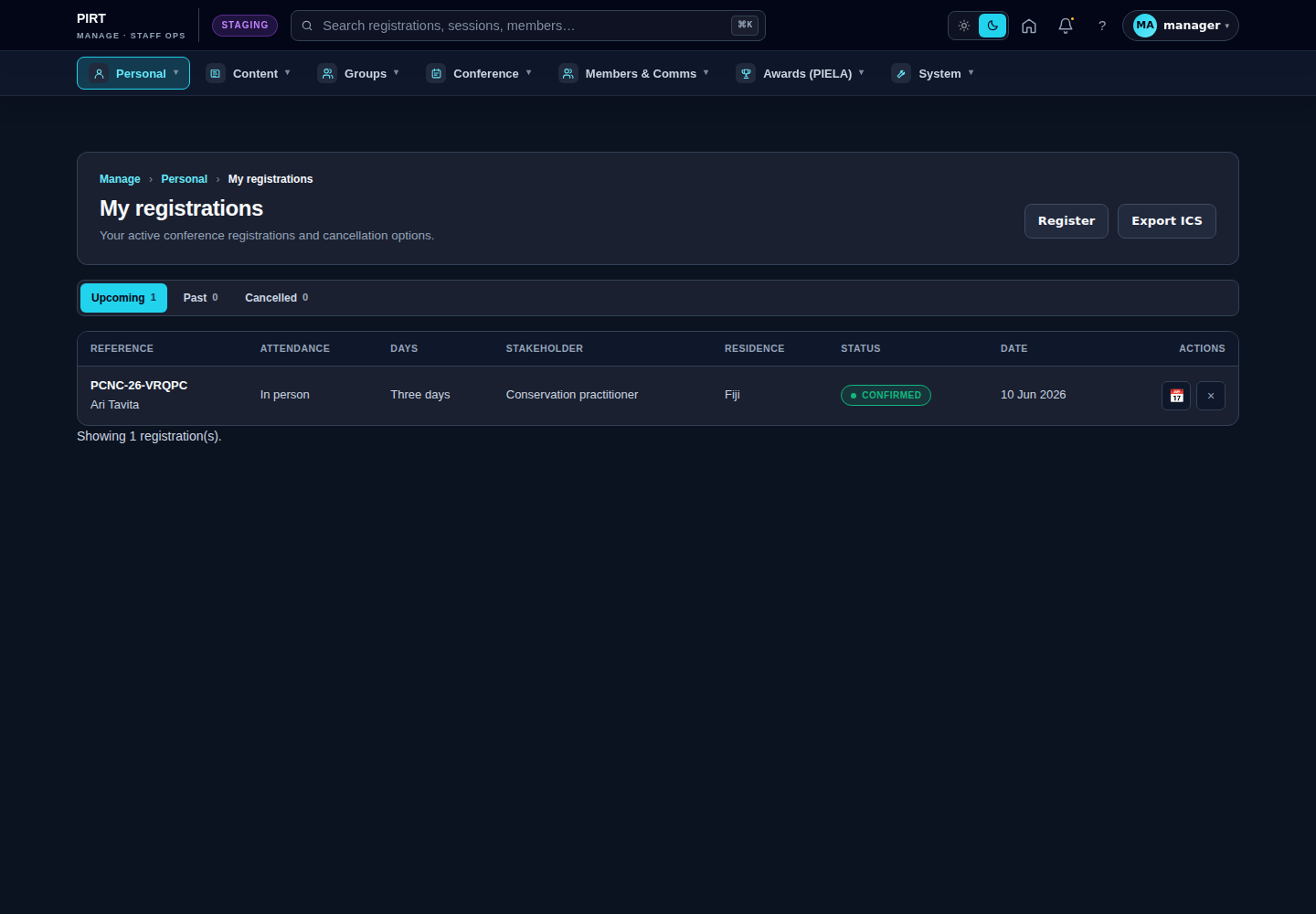
https://pirt.demo.weebpal.com/manage/me/registrations, grouped into Upcoming, Past and Cancelled.- View — click a row title to open a read-only summary of your answers and any payment receipt. Rows carry a status badge (Confirmed / Pending / Cancelled) and your role (delegate, speaker, volunteer).
- Cancel your own — click Cancel on the row and confirm. The registration moves to Cancelled and a notice is emailed to you and the secretariat. Refunds are handled separately by the secretariat, not on this page.
- Download calendar — use the per-row Download calendar (.ics) action for a single event, or Export ICS in the header for one file covering all your upcoming registrations.
This page only ever shows your registrations. Managing other delegates' bookings is a separate, permissioned task in the conference area — not here.
Notifications
Your in-app inbox is at https://pirt.demo.weebpal.com/manage/notifications. It splits into a Queue (items needing a decision from you — review requests, approvals, moderation flags) and Direct activity (replies, mentions and system messages for your awareness).
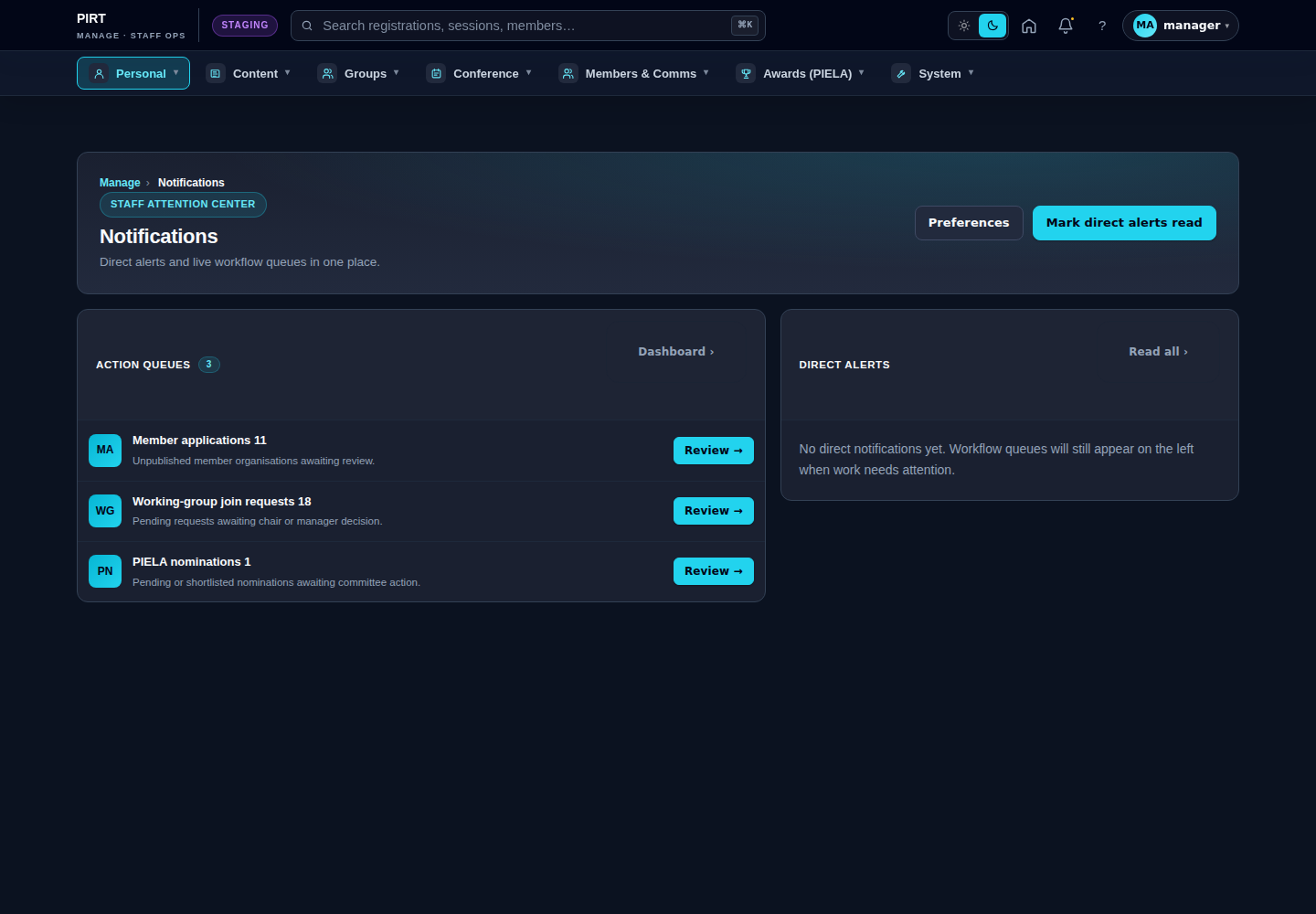
https://pirt.demo.weebpal.com/manage/notifications.- Click a queue row to jump straight to the item that needs attention; it marks itself read once you act.
- Use a row's Mark read, or Mark all read in the header, to clear the unread dots.
- Click Preferences (which opens
https://pirt.demo.weebpal.com/manage/me/profile?tab=notifications) to toggle channels — email digest, in-app, mentions, replies, system alerts — and choose a digest cadence (Immediate / Daily / Weekly / Off).
The badge in the topbar mirrors your Direct unread count, so open the inbox to see how much is waiting in the queue.
Your data & privacy
Two self-service tools let you exercise your data rights without contacting anyone.
Export your data (GDPR)
- Open
https://pirt.demo.weebpal.com/my-account/exportwhile signed in. - A JSON file (
pirt-my-data-<date>.json) downloads, containing your account details, your registrations and your agenda bookmarks. - Keep it for your records or to satisfy a data-portability request — it is a complete, machine-readable copy of what we hold about you.
Request account deletion
- Open
https://pirt.demo.weebpal.com/my-account/delete-requestand confirm. - This does not delete your account immediately. It queues a request that our team reviews and actions within 30 days, so legitimate records aren't lost by accident.
- You receive an email confirming the request has been logged. Until it is actioned, your account stays active.
Quick reference — every function and its URL
| Function | Public URL | Workspace URL |
|---|---|---|
| Dashboard | https://pirt.demo.weebpal.com/my-account | — |
| Profile & account | https://pirt.demo.weebpal.com/user | https://pirt.demo.weebpal.com/manage/me/profile |
| Agenda & bookmarks | https://pirt.demo.weebpal.com/my-account/agenda | https://pirt.demo.weebpal.com/manage/me/agenda · https://pirt.demo.weebpal.com/manage/me/bookmarks |
| Add a custom agenda item | — | https://pirt.demo.weebpal.com/manage/me/agenda/add |
| iCal feed | https://pirt.demo.weebpal.com/my-account/agenda.ics | https://pirt.demo.weebpal.com/manage/me/agenda.ics/<token> |
| My registrations | https://pirt.demo.weebpal.com/my-account (Registration tab) | https://pirt.demo.weebpal.com/manage/me/registrations |
| Notifications | — | https://pirt.demo.weebpal.com/manage/notifications |
| Data export (GDPR) | https://pirt.demo.weebpal.com/my-account/export | — |
| Account deletion request | https://pirt.demo.weebpal.com/my-account/delete-request | — |
Tips
- Set your time zone first. Do it once on the Account tab when you join — every session time, programme slot and deadline then renders correctly for you everywhere.
- Email changes are two-step. A new address only becomes active after you click its verification link; until then your old address keeps receiving mail.
- Keep your iCal token private. Anyone with the URL can read your agenda. If it leaks, regenerate it from your agenda page.
- Cancel early. You can cancel your own registration any time it is open for changes; once the conference locks editing you will need the secretariat instead.
- Scan the queue before clearing it. Marking everything read is quick, but queue items are work waiting on a decision — read those first.
- Deletion is reviewed, not instant. If you need data removed urgently, lodge the request and email the team so they can prioritise it within the 30-day window.
Editor vs Manager view
The same screen as each role sees it. Click a row to expand.
Editor
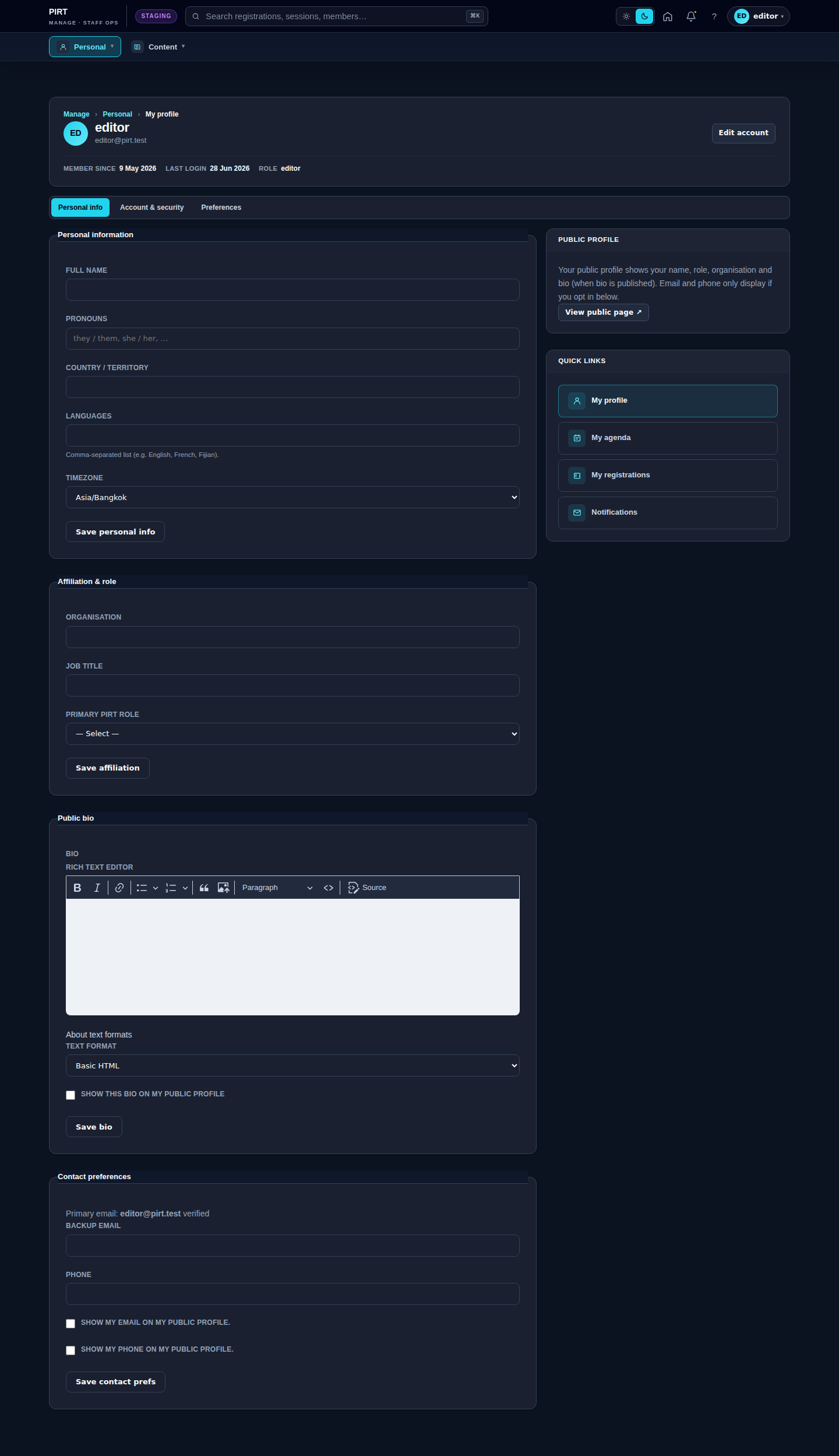
Manager