Site copy — PIELA award categories
https://pirt.demo.weebpal.com/admin/config/pirt/piela-categories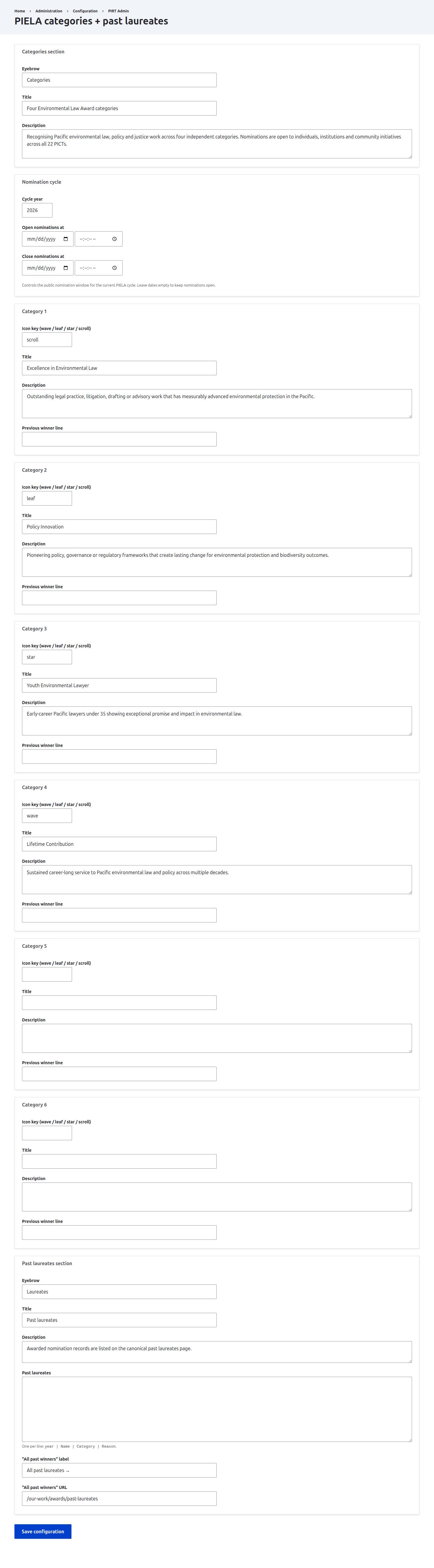
https://pirt.demo.weebpal.com/admin/config/pirt/piela-categories.What this manages
This screen controls the editorial copy for the PIELA award categories and the past-laureates records. What you save here drives the public pages at https://pirt.demo.weebpal.com/our-work/awards (the category cards and the current nomination cycle) and https://pirt.demo.weebpal.com/our-work/awards/past-laureates (the laureate list and the "all past winners" link). It does not capture or moderate nominations themselves; it only governs the published copy and the nomination window dates.
The editing form lives at https://pirt.demo.weebpal.com/admin/config/pirt/piela-categories and is Manager-only. Because this form sits on the Drupal https://pirt.demo.weebpal.com/admin surface, Editors who do not hold the Manager role will receive an Access denied message when they open this URL. If your day-to-day Editors need to maintain this copy, raise a request to have it surfaced inside the https://pirt.demo.weebpal.com/manage dashboard in a later release; for now, treat it as a Manager task.
How the form is organised
The form is split into four groups, top to bottom:
- Categories section — the eyebrow, title and intro that introduce the category cards on
https://pirt.demo.weebpal.com/our-work/awards. - Nomination cycle — the cycle year and the optional open/close dates that frame the public nomination window.
- Category 1 to Category 6 — six numbered fieldsets, one per award category card. Each is independent, and any slot left without a Title is dropped on save.
- Past laureates section — the heading copy, the laureate records textarea, and the "all past winners" link shown on
https://pirt.demo.weebpal.com/our-work/awards/past-laureates.
How to edit
- Sign in with a Manager account and go to
https://pirt.demo.weebpal.com/admin/config/pirt/piela-categories. - Edit the Categories section fields at the top — the eyebrow, title and intro paragraph that sit above the category cards on
https://pirt.demo.weebpal.com/our-work/awards. - Set the Nomination cycle. Enter the Cycle year (between 1997 and 2100), then optionally set Open nominations at and Close nominations at. Leave both date fields empty to keep nominations open indefinitely.
- Fill in each Category fieldset you want to display. There are six slots (Category 1 to Category 6). For each one, type an Icon key, a Title, a Description and an optional Previous winner line.
- Leave a category's Title blank to hide that slot entirely — a category with an empty Title is dropped on save and never appears on the public page, even if its other fields are filled in.
- Edit the Past laureates section heading copy (eyebrow, title and intro), then enter the laureate records in the Past laureates box, one per line, using the pipe format described below.
- Set the "All past winners" label and "All past winners" URL for the link at the foot of the laureates page.
- Click Save configuration. Then open
https://pirt.demo.weebpal.com/our-work/awardsandhttps://pirt.demo.weebpal.com/our-work/awards/past-laureatesin a new tab to confirm the result.
Past-laureates line format
Each laureate is one line in the Past laureates textarea, written as four values separated by the pipe character (|):
year | Name | Category | Reason
For example: 2024 | Dr Ana Tuilagi | Excellence in Environmental Law | Landmark biodiversity litigation across three nations. A line is only accepted if it contains at least three pipe characters (the four parts); lines that are blank or have fewer than three pipes are silently skipped on save. Always reload the public page afterwards to confirm every record you expect actually appears.
All fields on this form
| Section | Field | Type | What it does |
|---|---|---|---|
| Categories section | Eyebrow | Text | Small label above the categories title on https://pirt.demo.weebpal.com/our-work/awards (e.g. "Categories"). |
| Categories section | Title | Text | Main heading for the categories area. |
| Categories section | Description | Textarea (3 rows) | Intro paragraph beneath the categories title. |
| Nomination cycle | Cycle year | Number (1997–2100) | The year of the current PIELA cycle; defaults to the current year if left empty. |
| Nomination cycle | Open nominations at | Date & time (optional) | When the public nomination window opens. Leave empty to keep nominations open. |
| Nomination cycle | Close nominations at | Date & time (optional) | When the nomination window closes. Leave empty to keep nominations open. |
| Category 1–6 | Icon key | Text | Picks the card icon. Valid keys are wave, leaf, star and scroll. |
| Category 1–6 | Title | Text | The category name. Leaving this blank hides the whole category. |
| Category 1–6 | Description | Textarea (3 rows) | Short explanation of what the category recognises. |
| Category 1–6 | Previous winner line | Text | Optional single line naming the most recent winner of this category. |
| Past laureates section | Eyebrow | Text | Small label above the laureates title on https://pirt.demo.weebpal.com/our-work/awards/past-laureates. |
| Past laureates section | Title | Text | Main heading for the past-laureates page. |
| Past laureates section | Description | Textarea (2 rows) | Intro paragraph beneath the laureates title. |
| Past laureates section | Past laureates | Textarea (8 rows) | The laureate records, one per line, as year | Name | Category | Reason. |
| Past laureates section | "All past winners" label | Text | The link text for the call-to-action at the foot of the page. |
| Past laureates section | "All past winners" URL | Text | The destination the label links to (e.g. https://pirt.demo.weebpal.com/our-work/awards/past-laureates). |
Common tasks
- Close nominations for the current cycle. Set Cycle year to this year, then set Close nominations at to the cut-off date and time. The public window is treated as closed once that moment passes.
- Re-open nominations. Clear both the Open nominations at and Close nominations at fields and save; with no dates set, nominations read as permanently open.
- Add a new laureate. Add one new line to the Past laureates box in
year | Name | Category | Reasonorder, then save and reloadhttps://pirt.demo.weebpal.com/our-work/awards/past-laureatesto confirm it appears. - Retire a category. Clear the Title of the category slot you no longer want; its card disappears from
https://pirt.demo.weebpal.com/our-work/awardson the next save.
Tips
- Only four icon keys are valid. Use exactly
wave,leaf,starorscrollin the Icon key field — any other value will not render the intended icon. Match the icon to the category's theme where you can. - Title controls visibility. The form always shows six category slots, but only categories with a non-empty Title are saved and published. To remove a category, clear its Title rather than deleting the surrounding text — its other fields are simply ignored when the Title is blank.
- You can publish fewer than six categories. Leave the trailing slots empty; the public page only renders the categories that have a Title. The six fieldsets are a fixed maximum, not a requirement.
- Keep descriptions short. The category and section descriptions render as compact card and intro copy, so one or two sentences read best. The Categories and Past-laureates intros are three- and two-row textareas respectively, which is a hint at the expected length.
- Mind the pipe format. Every laureate line needs four parts and at least three pipes. If a record fails to appear on the public page after saving, check that the line has all four
|-separated values and contains no stray blank lines. - Verify both pages after saving. Category copy and the nomination cycle appear on
https://pirt.demo.weebpal.com/our-work/awards; laureate records and the "all past winners" link appear onhttps://pirt.demo.weebpal.com/our-work/awards/past-laureates. Reload both to confirm your changes before considering the task done. - Nomination dates are optional. Leave both Open nominations at and Close nominations at empty to present nominations as permanently open; set them only when you want the public window bounded for a specific cycle.
- This is Manager territory. If an Editor reports an "Access denied" error on this URL, that is expected — only Managers can reach the
https://pirt.demo.weebpal.com/adminsurface where this form lives. Until it is surfaced inhttps://pirt.demo.weebpal.com/manage, an Editor will need a Manager to make these edits. - Use a real path for the winners URL. The "All past winners" URL is a plain text field, so enter a valid internal path (such as
https://pirt.demo.weebpal.com/our-work/awards/past-laureates) or a full external link; the button uses exactly what you type. - Order laureates yourself. Records render in the order the lines appear in the textarea, so arrange them most-recent-first (or however you prefer) before saving.