Site copy — Error pages (403/404)
https://pirt.demo.weebpal.com/admin/config/pirt/error-pages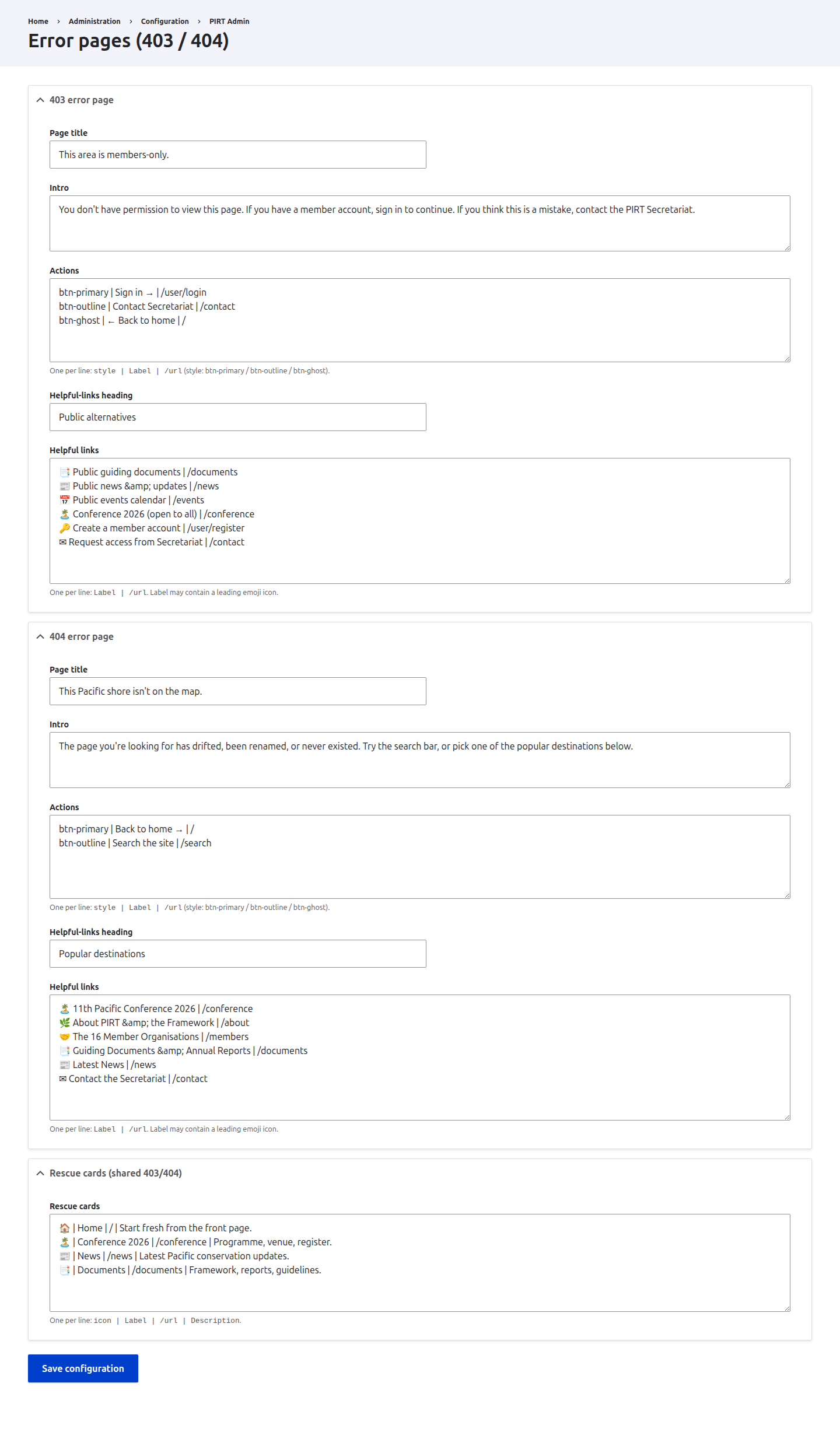
https://pirt.demo.weebpal.com/admin/config/pirt/error-pages.What this manages
This chapter covers the Error pages form at https://pirt.demo.weebpal.com/admin/config/pirt/error-pages. It drives the copy on the custom 403 (Access denied) and 404 (Page not found) screens, plus the shared "rescue cards" that appear on both.
The form is Manager-only. It is mounted on the https://pirt.demo.weebpal.com/admin surface (PIRT Admin → Configuration), so an Editor who opens this URL gets an Access denied message. If your Editors need to maintain this copy day-to-day, raise a request to surface the form inside the https://pirt.demo.weebpal.com/manage workspace in a later release; for now treat it as a Manager responsibility.
Legal pages are separate. The Privacy, Terms, Cookies and Accessibility pages already have their own editable content and are not managed here.
The Error pages form
https://pirt.demo.weebpal.com/admin/config/pirt/error-pages) — a 403 group, a 404 group, and a shared Rescue cards group, all open by default.The form has three groups, all open by default: 403 error page, 404 error page, and Rescue cards (shared 403/404). The 403 and 404 groups each contain the same five fields:
- Page title — the big heading on the error screen (e.g. "This area is members-only" or "This Pacific shore isn't on the map").
- Intro — a short paragraph below the title explaining what happened.
- Actions — the call-to-action buttons. One per line as
style | Label | /url, wherestyleisbtn-primary,btn-outlineorbtn-ghost. Lines with fewer than two|separators, or an empty label/URL, are skipped. - Helpful-links heading — the heading above the list of helpful links (e.g. "Public alternatives").
- Helpful links — one per line as
Label | /url. The label may start with a leading emoji.
The third group, Rescue cards, is a single field shared by both error pages — one per line as icon | Label | /url | Description (four parts; lines with fewer than three | are skipped).
How to edit an error page
- Open
https://pirt.demo.weebpal.com/admin/config/pirt/error-pagesas a Manager. - In the 403 error page or 404 error page group, edit the Page title and Intro.
- In Actions, add or adjust button lines using
style | Label | /url. Keep at most onebtn-primaryas the main action. - Set the Helpful-links heading, then list links in Helpful links as
Label | /url(one per line). - If the small cards need changing, edit the shared Rescue cards field — remember these appear on both the 403 and 404 screens.
- Click Save configuration (one button saves both error pages and the rescue cards together).
- Verify live: visit a restricted URL while signed out to trigger the 403, and any unknown URL to trigger the 404.
Every field
| Group / field | Type | Format / what it does |
|---|---|---|
| 403 error page → Page title | Text field | Main heading on the Access-denied screen. |
| 403 error page → Intro | Textarea | Short paragraph under the title. |
| 403 error page → Actions | Textarea | style | Label | /url per line. |
| 403 error page → Helpful-links heading | Text field | Heading above the helpful-links list. |
| 403 error page → Helpful links | Textarea | Label | /url per line. |
| 404 error page → Page title | Text field | Main heading on the Page-not-found screen. |
| 404 error page → Intro | Textarea | Short paragraph under the title. |
| 404 error page → Actions | Textarea | style | Label | /url per line. |
| 404 error page → Helpful-links heading | Text field | Heading above the helpful-links list. |
| 404 error page → Helpful links | Textarea | Label | /url per line. |
| Rescue cards (shared) → Rescue cards | Textarea | icon | Label | /url | Description per line; shown on both screens. |
Tips
- One Save button. The single Save configuration button writes all three groups at once — make all your edits before saving.
- Mind the separators. Actions need two
|; rescue cards need three. Rows that fall short are silently dropped — re-open the form after saving to confirm your rows survived. - Full internal URLs. Use the demo-domain form for guide links (e.g.
https://pirt.demo.weebpal.com/contact). - One primary button. Reserve
btn-primaryfor the single most important action; usebtn-outline/btn-ghostfor the rest. - Rescue cards are shared. They appear on both 403 and 404 — write descriptions that make sense in either context.