Site copy — Our Work landing
https://pirt.demo.weebpal.com/admin/config/pirt/our-work-landing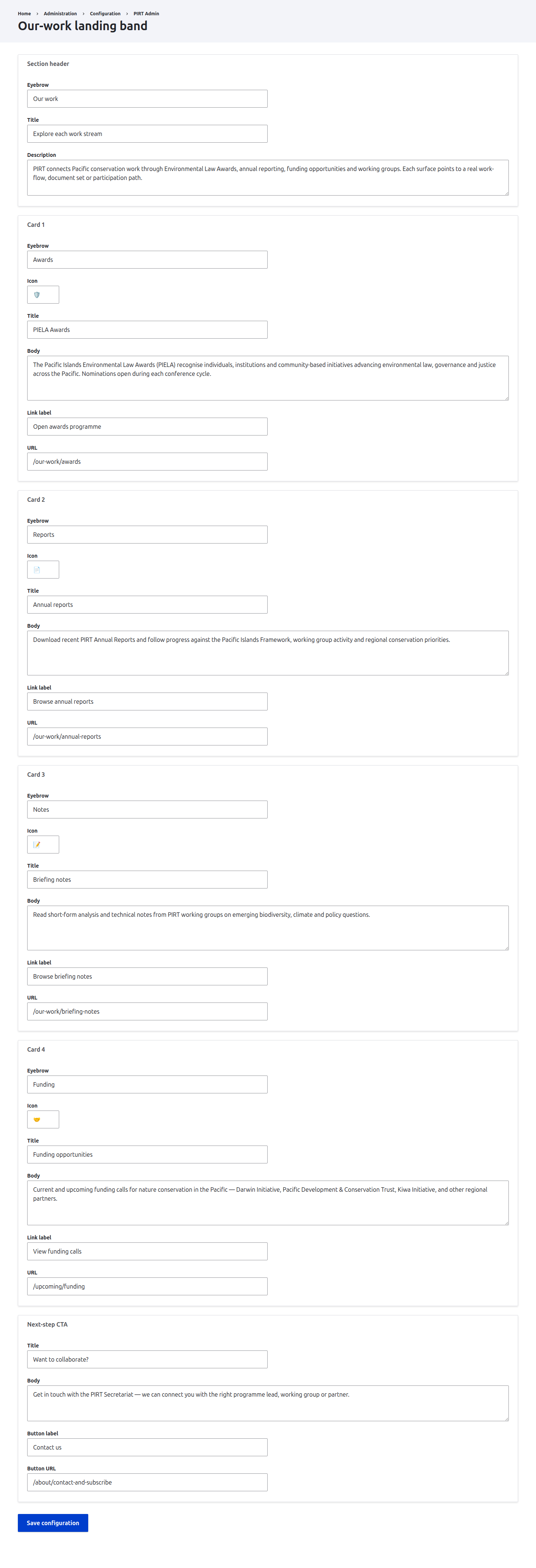
https://pirt.demo.weebpal.com/admin/config/pirt/our-work-landing.What this manages
This chapter covers the Our-Work landing band form at https://pirt.demo.weebpal.com/admin/config/pirt/our-work-landing. It drives the section header, up to four feature cards, and the next-step call-to-action on the public https://pirt.demo.weebpal.com/our-work page. The public page reads straight from this config, so a save here changes what visitors see.
The form is Manager-only — it lives on the https://pirt.demo.weebpal.com/admin surface, so Editors who open the URL get an Access denied page. If your Editors need to manage this copy day-to-day, raise a request to surface it inside https://pirt.demo.weebpal.com/manage in a later release; for now treat it as a Manager task.
The Working Groups hub has its own separate edit block and is not managed here.
How to edit
- Sign in as a Manager and open
https://pirt.demo.weebpal.com/admin/config/pirt/our-work-landing. - The form is split into labelled fieldsets — Section header, Card 1–4 and Next-step CTA. Scroll to the fieldset you want and edit the field inside it.
- Plain text fields (eyebrow, title, label, URL) take a single line; description/body fields are short paragraphs — plain text, not HTML.
- For URLs in this guide, use the full demo-domain path (e.g.
https://pirt.demo.weebpal.com/our-work/awards) or a full externalhttps://link. - The card Icon field accepts a short emoji or glyph.
- Click Save configuration at the bottom — the change is live immediately.
Every field
Up to four cards are supported. A card is only published if it has a Title or a Body — leave both blank to omit that card.
| Fieldset | Field | What it sets |
|---|---|---|
| Section header | Eyebrow | Small label above the section title. |
| Section header | Title | Main heading of the landing band. |
| Section header | Description | Intro paragraph under the title. |
| Card 1–4 | Eyebrow | Small label on the card. |
| Card 1–4 | Icon | Short glyph/emoji shown on the card. |
| Card 1–4 | Title | Card heading. Publishes if Title or Body is set. |
| Card 1–4 | Body | Card paragraph. Publishes if Title or Body is set. |
| Card 1–4 | Link label | Text of the card's link. |
| Card 1–4 | URL | Destination of the card's link. |
| Next-step CTA | Title | Heading of the closing call-to-action. |
| Next-step CTA | Body | CTA paragraph. |
| Next-step CTA | Button label | Text on the CTA button. |
| Next-step CTA | Button URL | Destination of the CTA button. |
Tips
- To hide a card, clear both its Title and Body — it then drops off the page (its other fields are ignored).
- Full internal URLs. Use the demo-domain form for guide links.
- Save writes everything in the form at once; the change is live immediately on
https://pirt.demo.weebpal.com/our-work.